
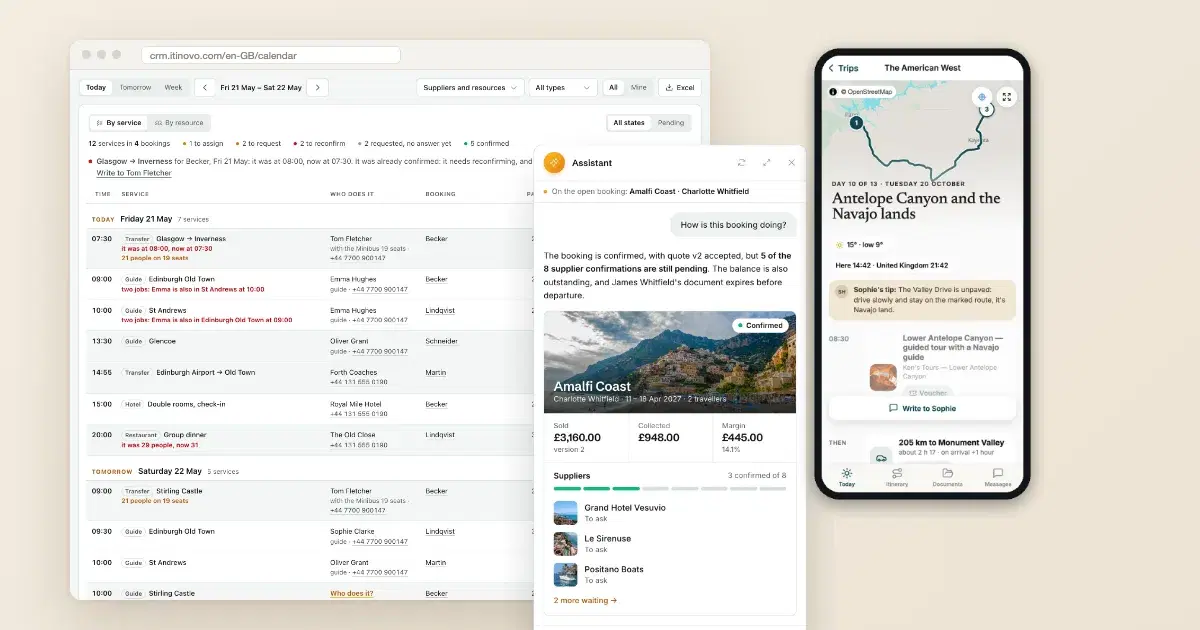
What's new in November
Since mid-October itinovo CRM has grown fast. Everyone's mailbox connects to the CRM, the assistant works beside the page, the Calendar has Operations with the agency's own people and vehicles, days on foot and by bike have a real route, the client portal has gone from six to fourteen layouts and has its own app, the Website starts from six ready-made sites, groups sign up by themselves and campaign emails are built from blocks. And itinovo now works with the home rules of ten countries, with Dutch as its seventh language.
Here are the most important changes, grouped by the work you do every day. Where a feature has its own page on the website you will find the link and the same image you see there.
Email, calendar and documents, inside the CRM
Each person connects their own mailbox. With Microsoft 365 the connection is complete: Outlook, calendar, OneDrive and SharePoint. With Google you get sending, the calendar and Google Drive. The emails you write from the CRM to clients and suppliers go out from your own address and stay in your sent mail; replies come back to the right booking.
The history in your bookings. With Microsoft 365, emails with clients, travellers and suppliers go into the booking on their own, with text and attachments; the CRM does not keep the others. With Google, and with mailboxes on your own domain read in Thunderbird, Outlook or Apple Mail, they come in through Bcc or forwarding.
The calendar, both ways. Appointments, tasks and departures arrive in an "itinovo" calendar next to yours. With Outlook your own appointments also show in the CRM's Calendar, and the agency's website does not offer the hours when you are busy.
Documents in the agency's folder. Quotes, contracts, vouchers and travel documents are copied into OneDrive, SharePoint or Google Drive, one folder per booking.
What isn't an email, too. Phone calls and WhatsApp messages are logged in the booking's Communications, next to the emails. And even without Microsoft or Google, with three DNS records the CRM's emails go out from the agency's domain.
Connected email, calendar and documents are on every plan: everything is on the Email, calendar and documents page. The CRM's Calendar also has two new views: Planning, with one trip per row over six weeks, and, from the Professional plan, Map, a globe with the groups travelling, who leaves within seven days and the countries with travel advice.
The assistant works beside you, and itinovo is inside Claude
The assistant opens from the "Ask the assistant…" field in the top bar, or with ⌘J (Ctrl+J on Windows), in a panel beside the page: the page stays readable and usable while you talk to it.
It knows what you have open. On a booking, a quote, a client or a supplier, "this booking" is the one in front of you. On a filtered list, "these bookings" are the ones listed.
It answers with cards, with the real data. The booking, the quote, the figures and the departures arrive as cards, and the text says what matters in two lines.
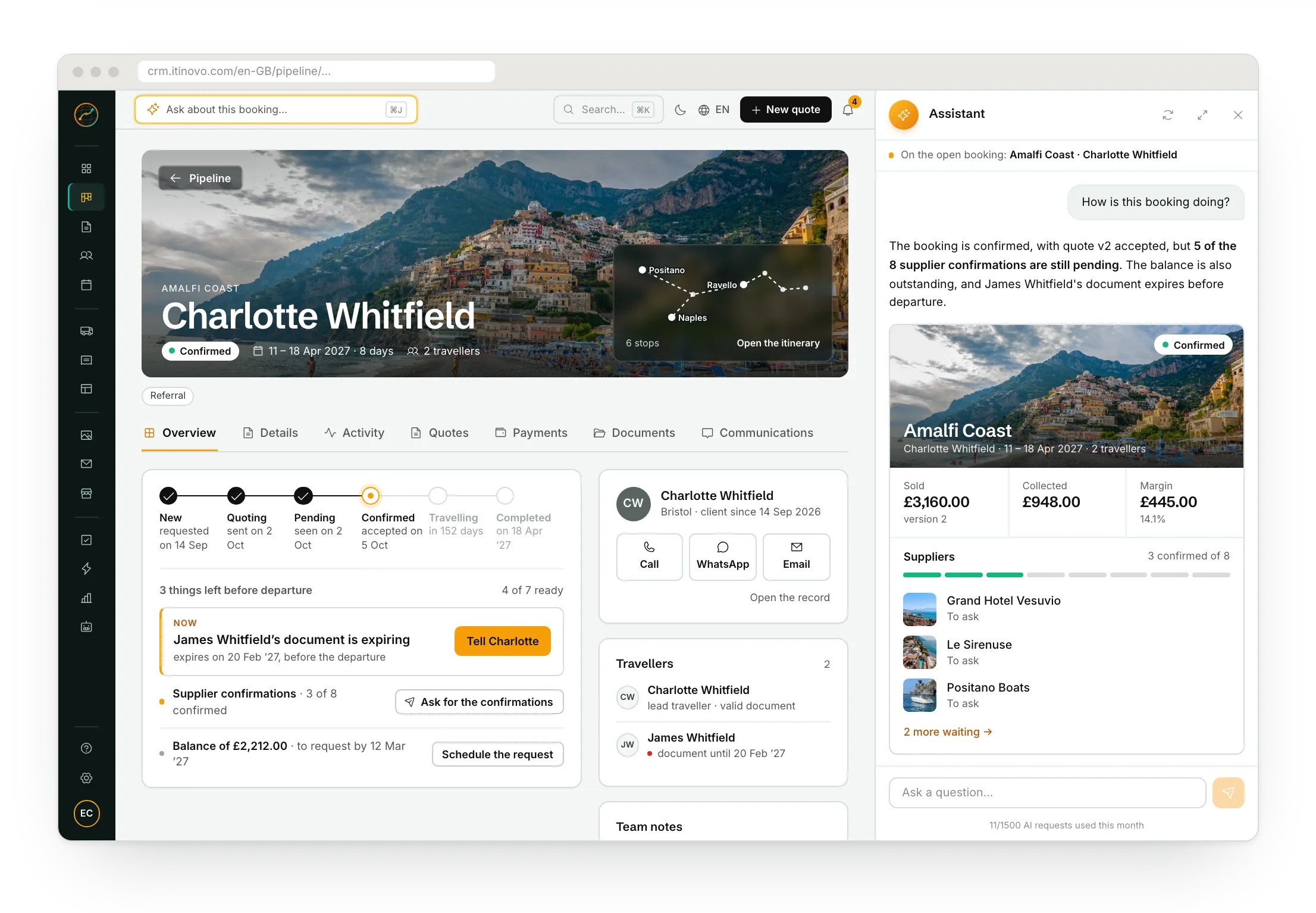
It asks before it acts. Before changing any data it says what it will do and waits for your confirmation. Before sending anything to clients or suppliers it shows who it goes to and what, and sends only after your click.
It builds trips with your suppliers. Ask it for an itinerary and it puts it together with the agency's hotels and services. Then it works on the quote: it changes the texts, adds or removes a day or a service, opens a new version.
It writes the way you do. In Settings › Profile, "How we write" rereads your templates and sent quotes and proposes your way of writing: the tone, how you address clients, the words never to use. From then on the AI writes quote descriptions, campaigns, the website and translations that way.
The same things can be done from Claude. itinovo is among the connectors in Anthropic's directory, and the quote appears in the conversation as a card that opens onto the full-screen itinerary, with the map of the stops. From the chat you can also change settings, always with your confirmation, and search for photos of a place to add to the trip in one click. Everything is on the Claude page.
Operations: who does what, today and tomorrow
Calendar › Operations lists the services sold for today and tomorrow, or for the whole week, across every supplier and every booking, in time order: transfers, guides, hotels, meals, activities. For each one you see who does it and their phone number, the booking, the number of people, the client's flight and where the confirmation stands. At the top are the figures for what is still missing; a service changed after confirmation says so, with "Write to …" to let the supplier know.
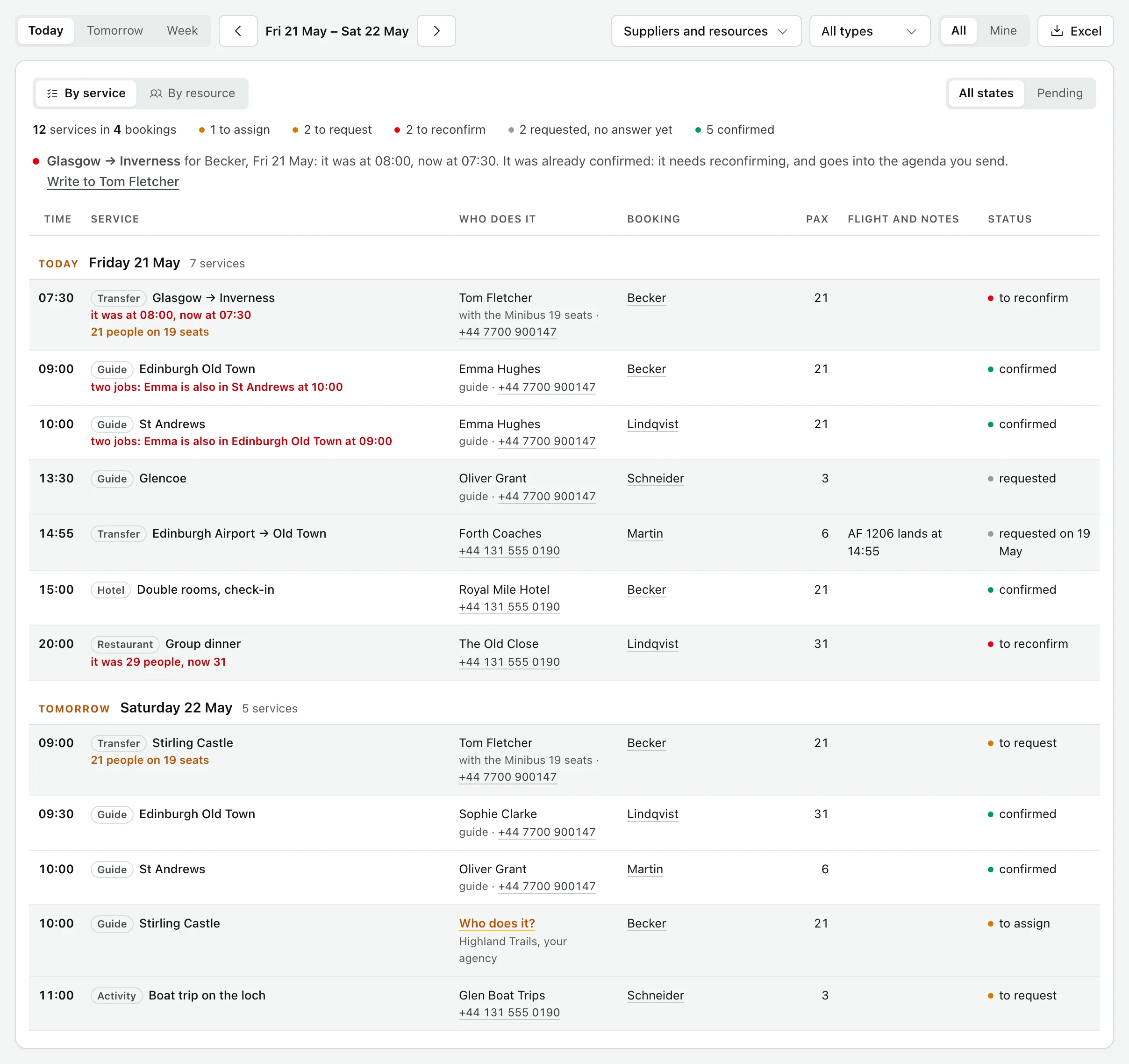
Your agency's people and vehicles. Guides, tour leaders, drivers and vehicles live in Suppliers › Your agency, with languages, licences, seats and number plate. On a service you run yourselves, "Who does it?" suggests who is free and who speaks the group's language. "By resource" shows each one's week, with days off and maintenance days, and marks two jobs at the same time in red.
The agenda for the people on the ground. "Send the agenda" emails the guide or driver their services for the period, across every booking. They open it on their phone, with no account, and reply "I confirm" or "I can't". Prices never appear.
Bikes and equipment. E-bikes, skis, boots and helmets are counted by size. The size is suggested from the measurements travellers enter in their form, and "To prepare" tells you how many pieces of each size to deliver and collect, day by day.
People, vehicles and equipment are on the Professional and Business plans. Everything is on the Operations management page.
On foot, by bike and by coach: the day's route
The day's route is now drawn on a large map, with relief and trails. On days on foot and by bike it is worked out on the paths, mule tracks and cycle paths of OpenStreetMap with itinovo's own routing engine, not on the roads for cars, and it works all over the world. Each stretch gives kilometres, time and climb, for example "5.7 km on foot · 3 h 47′ · ↑ 920 m", and the day says what it is made of: trail, dirt road or road, with the difficulty of the trails on the SAC scale. A guide's GPX can be uploaded and the day follows it; the day's own GPX can be downloaded for navigation apps.
The self-guided roadbook. For every day on foot or by bike the roadbook prints the map with the track, the distance, the climb and the time, the climbing profile, step-by-step directions in the client's language and a QR code that opens the trip on the phone, where the track can be downloaded. The agency can correct the directions line by line.
Along the way. On foot, mountain huts, bivouac huts, drinking fountains, shelters and viewpoints; by bike, bike repair stations, bike shops, campsites, castles and museums. The OpenStreetMap points near the path appear in the editor, with the huts' details, and you choose what the client sees in the roadbook, the portal and the app. On a transfer by coach the CRM suggests the coach parks near the place, with the walking minutes.
The day that doesn't fit. If the road between two services needs more time than there is, a notice says so and suggests a time that works. A second notice flags days with more than 9 hours of driving, the daily driving time of a professional driver in the EU.
Transfers. Under a transfer on the day of a flight there is the advised pickup time, worked out from the flight and the road to the airport. And a rate per km or per hour, with the minimum and the vehicle's empty return, does the count by itself on the calculated road.
The client portal: from six to fourteen layouts, and an app
The six layouts you can try live in the demo portal (Classic, Modern, Minimal, Nature, Luxury and Corporate, for corporate events) have been joined by eight more, each designed for a type of trip:
- Romantic, for weddings and couples' trips: the real sky of the first night, a moon for each night, letters to open on the right day.
- Family, for trips with children: the grown-ups read the hours on the road and the stops, the children have a passport with a stamp for each stage.
- Sport, for cycling, golf, running, skiing, sea sports and tennis: the GPX track with the climbing profile, the month's conditions, the kit bag and the team.
- Portolan, for cruises: the route port after port, the arrivals in 3D, the ship and the cabin.
- Stay, for a holiday in a single hotel: the page is the hotel, with the room, what is within walking distance and the extras to add.
- Incentive, for companies' reward trips: first the proposal to the company, then the reveal to the winners.
- Woven, for any destination: the land in relief in its true colours and the road stitched stop by stop.
- Noir, a second luxury layout: black and white, the cover photo inside the letters of the title.
In the demo you see them in photographs; in the CRM they are chosen for the agency or for a single trip, on the Professional and Business plans.
The cover can play a video instead of the photo, from Pexels, YouTube or Vimeo, muted. And photos are searched on Unsplash, Pexels and Wikimedia Commons in a single search: itinovo credits the author wherever the photo appears.
The client app. The trip reaches the client's phone as an app with the agency's name and icon: all their trips, "Today" with the day's programme and map, documents even offline, notifications and vouchers in the iPhone's Wallet. When they get back, "Welcome back" asks how it went, and the request for the next trip starts from the app and arrives as a new booking.
The app is on every plan: everything is on the Client app page.
The Website starts from a design and you write on the page
The Website is out of beta. You start from six ready-made sites, built from what the CRM knows about the agency: name, logo, contact details, trips with departures and prices, reviews. You choose the style by looking at it, and nothing goes live until you publish. A section with no content starts hidden: nothing is made up.
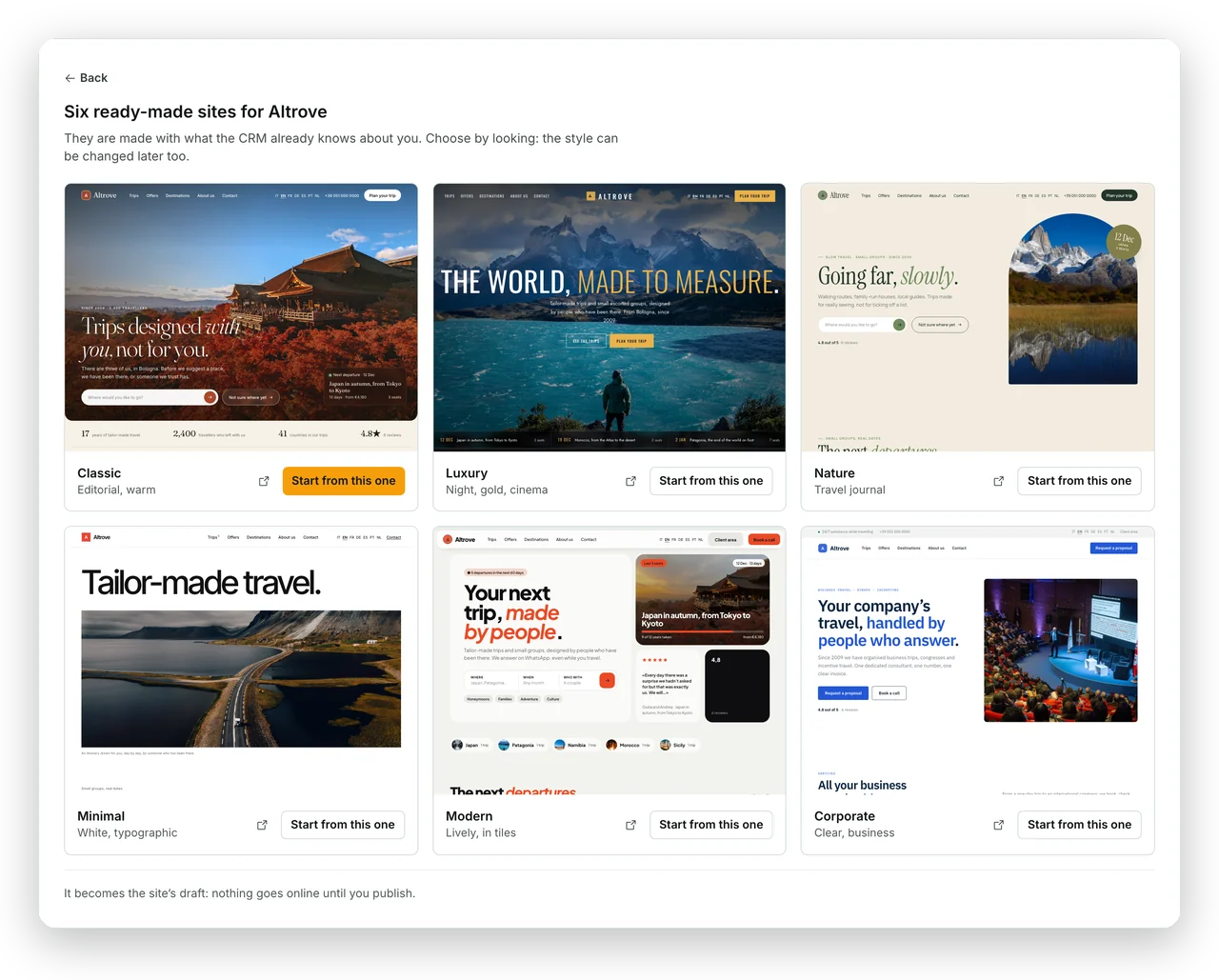
You write on the page. Click a text and type; a click on a photo changes it. You flip through each section's looks with the arrows, and the "+" between two sections adds a new one.
On the site you already have. If you already have a site, the box with your trips, offers and enquiry form pastes into it in three steps. Each trip also has its own page to send to clients, by link, on WhatsApp or with a QR code.
What it brings in. The Website's Overview opens with the month's enquiries, the accepted quotes and what has been sold, split by channel: the itinovo site, the box on your site, shared trip pages, the link in bio.
Everything is on the Website page.
Groups, events and trips by sign-up
For groups where everyone pays their own share (the club, the association, the scheduled departure) you send a link and each participant signs up themselves: they choose the accommodation, enter their details, accept and pay the deposit. Each sign-up is a booking of its own, with its own contract and payments; the group keeps the programme, suppliers and rooming list for everyone. Once the places are gone there is the waiting list, the CRM tells you where you stand against the minimum to depart, and a "Notice to the sign-ups" reaches every sign-up in the portal, in the app and by email.
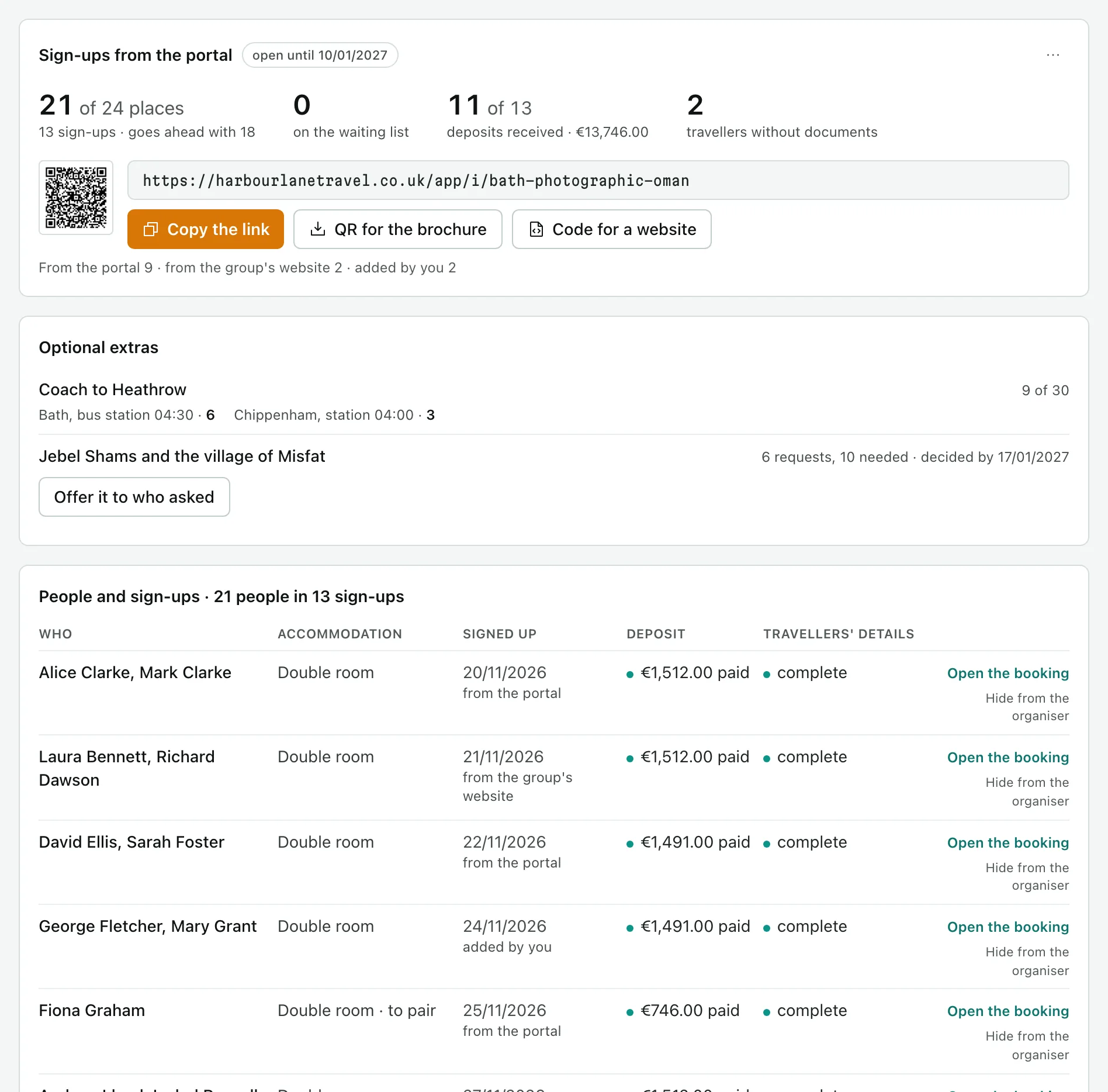
For corporate events there is the programme by day and by room, with checks for overlaps, the company's purchase order number and cost centre, and the Corporate portal with agenda, flights, venues and budget. Groups and MICE are on the Professional and Business plans: everything is on the Groups and MICE and corporate events pages.
Suppliers: a new page and less data to copy
The page, redesigned. Every supplier has Overview, Contacts and documents, the tab for its service, Conditions, Statement, Agenda and Communications; every service has a single page with rates, photos and translations. The data is the same as before: nothing needs re-entering.
The statement and the agenda. Booking by booking, what is due, what you have paid and what is left: you send it to the supplier, who replies whether the balance matches. The week's agenda, across all bookings, reaches the supplier in a single email, and they confirm service by service. Suppliers also reply to availability and confirmation requests with one click from the email.
Rates the way the supplier writes them. Early booking and long stay discounts flow into the quote by themselves. A rate by number of people ("2 people 480, 3 people 560") picks the right band. A stay across two seasons takes, for each night, the price of its own season. Next year's rates can be copied before the contract, marked as estimated.
Price lists read better. AI import reads the seasons even from a colour-coded calendar, tells you which pages to check and also reads scanned PDFs.
A tidy list. Two records with the same VAT number, email or phone can be merged into one. Search finds the supplier from the service ("cooking class"), and tags work like the clients' ones. "Your agency" is the catalogue of what you run yourselves, such as excursions, guides and transfers: in the quote those lines start out confirmed.
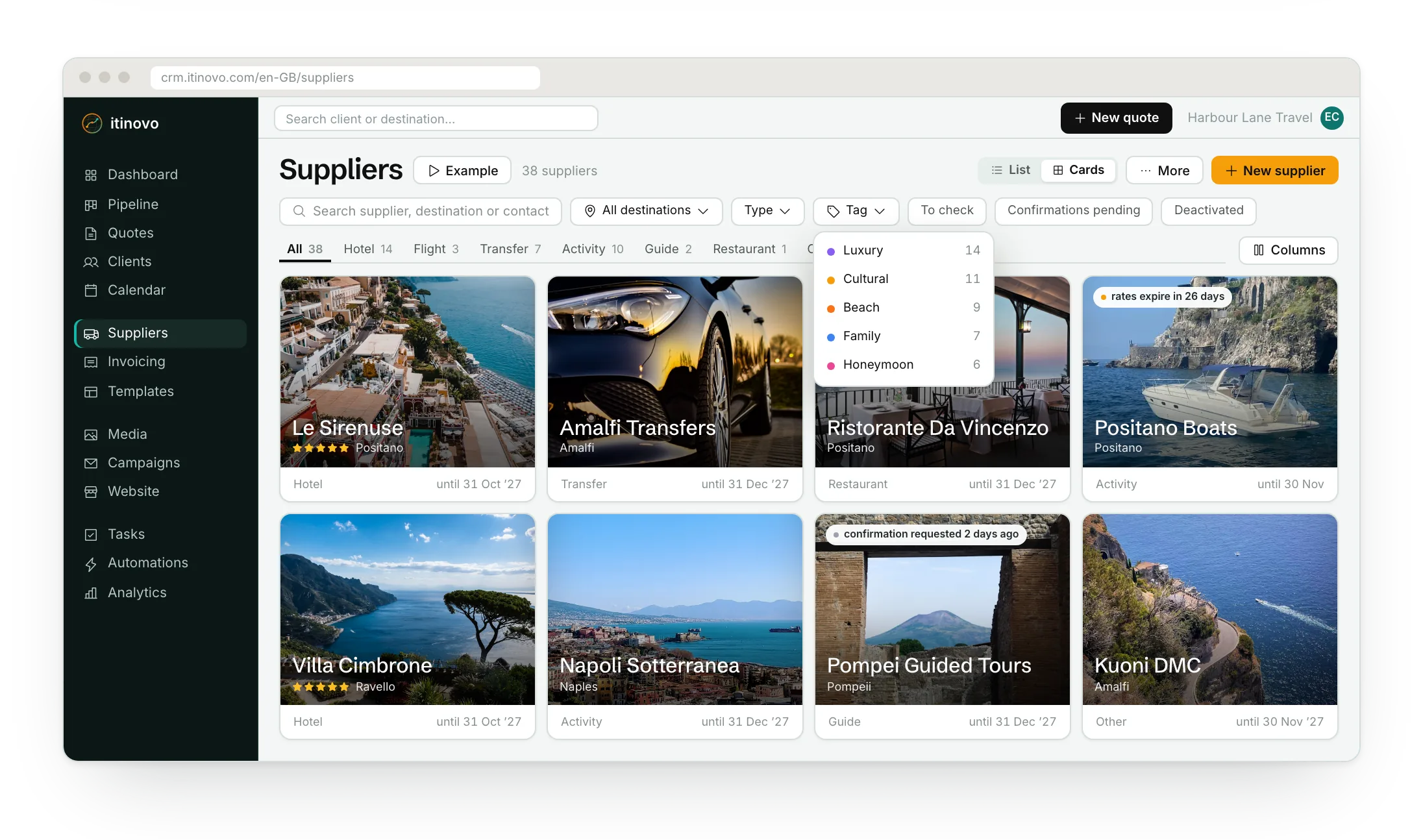
Everything is on the Supplier Catalogue page.
Quotes and payments
A manager's approval. If you switch it on, an operator's quote goes to a manager before it reaches the client: they see prices and margin, and approve or reply with a note. If prices, services or terms change after the yes, it needs approving again. On the Professional and Business plans, with at least two people in the team.
One editor for the texts the client reads. Bold, italics, lists and links with the same toolbar everywhere: days, services, supplier records, messages. The text looks the same in the portal, the PDF, emails and on the website.
Prices that are simpler to write. You type the selling price directly and the markup is worked out from it. "Round" brings the per-person price to a round figure. Mandatory charges paid locally are included in the total shown to the client, who sees how much they will pay there.
Bank transfers that mark themselves as paid. With Stripe connected, the client gets a dedicated IBAN from the portal and, when the transfer arrives, the payment is recorded on the booking. Payment methods are chosen proposal by proposal.
One quote from several templates. "Create a quote with templates A, B and C": the assistant and Claude do it, with the rates read on the right dates. And a template can be added to any day of a quote.
The quote builder is described on the Quote Builder page.
Campaigns: emails built from blocks, and what they bring in
Campaign emails are built from blocks, in an editor that shows the email as the client receives it. The travel blocks (Trip, Several trips, Departures, Destination) take the trips from your catalogue, with the prices, departures and seats as they stand when the campaign goes out. "Compose with AI" writes the email in the agency's voice, and the travel templates (the offer of the month, upcoming departures, last seats) start out already filled with your trips.
In several languages. The AI translates each extra language, and every client receives the version in their own language.
What it brought in. After sending, "Requests and sales" tells you how many bookings the campaign opened, how many are confirmed, how much they sold and at what margin. In Analytics the same figures can be read by market, by partner agency and by campaign.
Campaigns are on the Business plan: everything is on the Marketing Campaigns page.
Several brands, companies and partners
Several brands in one agency. If you sell under more than one name, for instance one for tailor-made trips and one for inbound, you keep them in a single itinovo: same company, same suppliers, same team. Each brand has its own name, logo, colour, contact details and website, and the client sees only the one on their booking. Up to 2 brands on Professional and 5 on Business.
A company's people. A company client has its own people, and each booking says who the contact person is: quotes, documents and messages go to that person, while invoices stay in the company's name.
Linked DMCs and tour operators. A DMC on itinovo sells its experiences and services to a tour operator on itinovo, which finds them in its own trips with the price for the date and the number of people. And in agreements with reseller agencies, prices stay locked until the end, or change with the notice you decide.
Ten countries and seven languages
The Netherlands and Belgium have joined October's eight markets, and Dutch is the CRM's seventh language: interface, help guide, assistant, documents, emails, portal and app. For the Netherlands there is the travel agents' scheme with the margin calculated per trip or per period, as the agency chooses; for Belgium the flat-rate base; for clients in both countries, the package travel terms and the information form required by their law, in their language.
Other changes by market. In Germany, insolvency protection with the Sicherungsschein, asked for and attached where needed, and a complete Impressum. In the United Kingdom, the ATOL certificate, prepared automatically at the first payment, and selling as the agent of an ATOL holder. Agencies outside Europe get their country's currency and language, with the European rules switched off.
And for everyone: invoices issued with your own software are recorded in itinovo and count towards the total invoiced, and sign-in has two-step verification. The Payments & Administration page sums up payments and invoices by country.
What next
The CRM also has a new look: a booking opens on its Overview, with the trip's cover and what there is to do, and lists show the trips' photos. The simplest way to see everything is to try it: the free trial lasts 30 days, with the features of the Business plan. And until 31 December 2026, anyone who activates an annual Professional or Business plan locks the price for three years, even during the trial. Everything is in the Pricing section.
Ready to modernise your agency?
itinovo CRM handles margin scheme VAT, quotes, invoicing and suppliers, so you can focus on your clients.
Start free trial