
Flights · with your Duffel account
Search, book and issue flights inside the quote
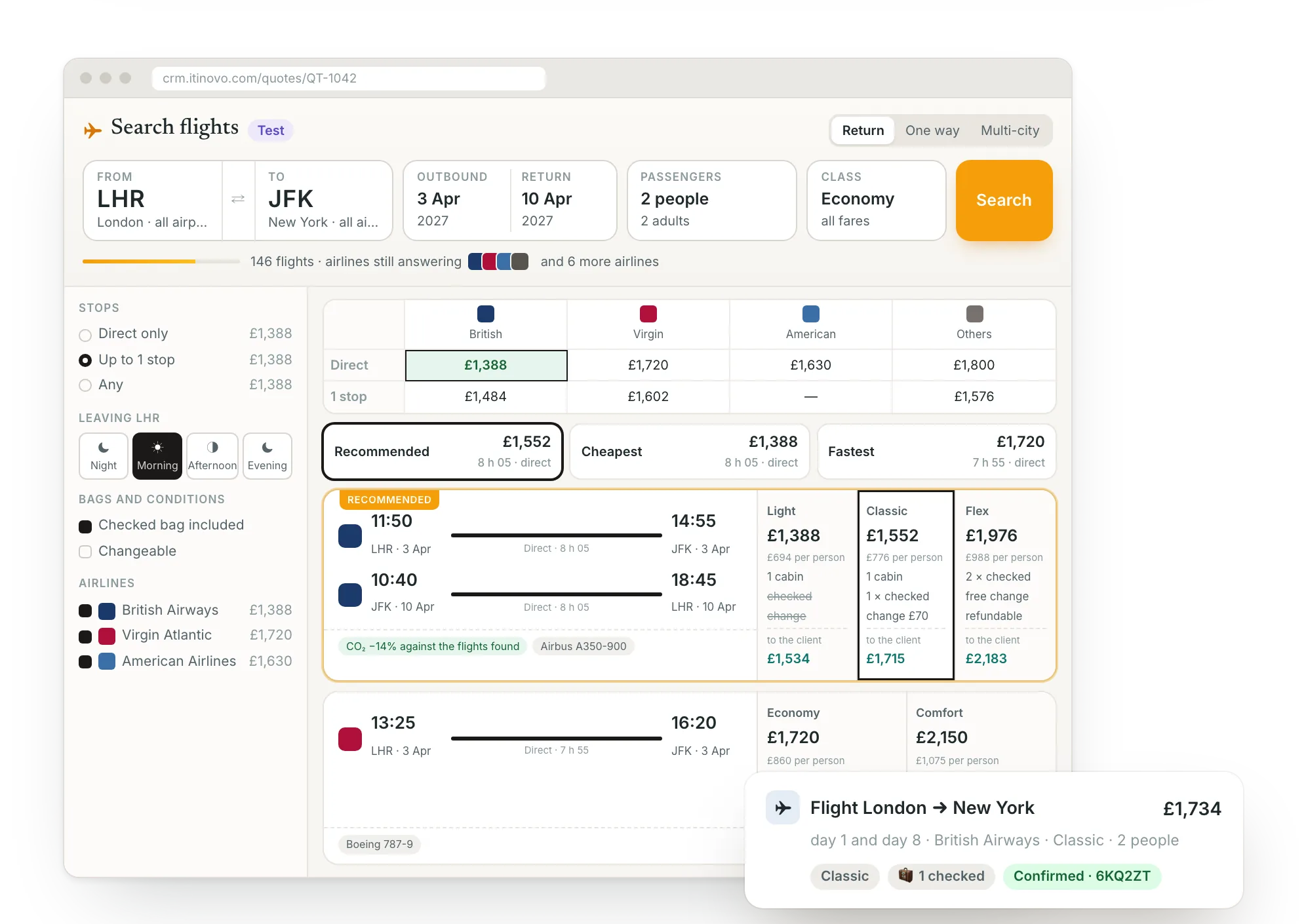
Over 300 airlines, with fares side by side, the seat map and bags. The flight you choose goes into the days of the trip with your markup; you book it when the client says yes. Duffel issues the tickets with its own IATA accreditation: you don't need one.
On every plan · No card required · Bookings included in Professional and Business
The flight provider
What Duffel is, and why we use it
Selling air tickets takes IATA accreditation, a connection to the airlines and a ticketing agreement: slow and costly for an agency. Duffel already has them, and makes them available to those who sell travel.
Duffel is a technology company based in London that connects airlines to those who sell travel: agencies, platforms, companies. It gathers in one place the offers of over 300 airlines, including those that sell their best fares only through the IATA NDC standard.
With its «Managed Content» service it issues tickets under its own IATA accreditation: your agency sells and collects, the tickets are issued in the passengers' names and the contract of carriage is between them and the airline. That is why you don't need to be an IATA agency.
The account belongs to your agency, not to Itinovo. You open it for free on Duffel's website, top up the balance that pays for the flights and see every booking there. Itinovo talks to it with a token you create and can revoke at any time.
Duffel
Duffel Technology Limited · London, United Kingdom
- What it does
- Connects those who sell travel to the airlines: search, booking, seats, bags, changes and refunds
- Airlines
- Over 300
- Standard
- IATA-certified level 4 NDC aggregator: offers and orders handled end to end
- Ticketing
- Under its own IATA accreditation, in the passengers' names
- Payments
- From your account's balance; its fees on the card you register
- Subscription
- None: you pay per booking, under its price list
Sources: duffel.com and Duffel's help centre (Managed Content, NDC), October 2026.
The integration
Three players, each with its own job
Itinovo is where you work. Duffel is the channel to the airlines. The airlines fly your clients. Money and tickets never go through Itinovo.
Where you work
Itinovo CRM
- Searches flights from the quote
- Puts them on the days, with your markup
- Takes the passengers from the file, or reads their passports with the AI
- Shows the client fare, bags and conditions
- Receives the airlines' notices
Collects nothing and issues nothing
Your account
Duffel
- Queries over 300 airlines
- Issues tickets in the passengers' names
- Pays the airline from your balance
- Charges you its fees
Its dashboard shows everything, even without Itinovo
Who flies
The airlines
- Carry the passengers
- Set fares, rules and seats
- Notify changes and cancellations
Contract of carriage with the passenger
The price of the flight
Comes out of your Duffel account's balance, which you top up by bank transfer. The booking button shows the exact amount; if the balance is not enough, nothing is booked and nothing is charged.The client
Pays you, as for any other service of the trip: deposit and balance from the portal or at the agency. The markup on the flight is your profit.Passenger data
Name, birth date, sex and document are read by the AI from a photo of the passport, or come from the file. They go to the airline through Duffel for that booking only.In ten minutes
Connect the account once, search from every quote
- 1
Open your Duffel account
Free, on its website. Enter the agency's details, a card for the month's fees, and top up the balance by bank transfer.
- 2
Create a token
In Duffel's dashboard, under «Developers › Access tokens», a read and write token. You can revoke it at any time.
- 3
Paste it into Itinovo
In Settings › Integrations › Flights. From then on every Flight row has «Search flights»; choose who in the agency can book.
Want to try first? Connect a test token (it starts with duffel_test_): fake flights and prices, no payment, every booking marked «Test» everywhere. Run the whole journey, seat map included, and switch to the live token when you're ready.
The journey
From search to ticket, without leaving the quote
No copy and paste from another website: the flight you choose is the one you book, with the price checked again when needed.
1 · Search
Fares side by side
Return, one way or multi-city. Destination, dates and passengers, children included, come from the file. Each flight with its fares: bags, changes and refunds at a glance, prices in the quote's currency.
2 · In the quote
On the right days, with your markup
Outbound and return go on their days, linked as one ticket. The agency's flight markup, never on the taxes. «Check price» finds the same flight and fare again and tells you whether price or conditions changed.
3 · Book
Passengers, seats, bags, payment
Four steps: today's price, the passengers as on their documents (photograph the passport and the AI fills it all in), seats and bags if the airline sells them, then pay from the balance or put on hold, when the airline allows it.
4 · Done
Reference and tickets in the file
The flight rows take the reference and tickets, the supplier confirmation follows, the file's history records it. If the provider does not answer in time, the CRM blocks a second booking until you check.
Passengers without retyping
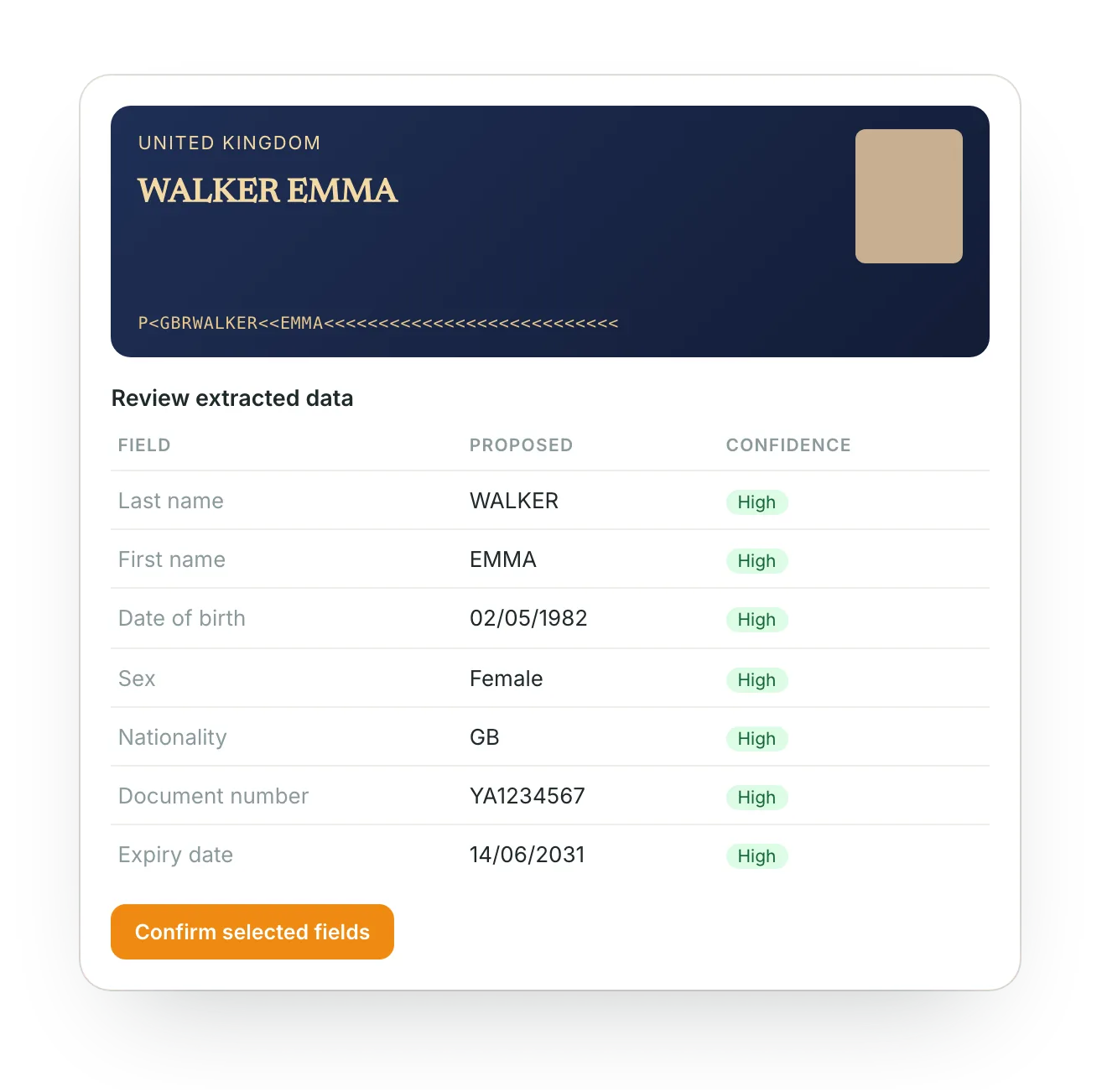
Photograph the passport, the AI fills in the booking
The name must be exactly as on the document: a typo on a ticket costs a name change, when the airline allows one. With the AI scan nothing is typed.
- From the «Passengers» step. Upload the photo or PDF of the document and the AI reads name, birth date, sex, nationality, number and expiry.
- Check and confirm. Every field read is marked; the uncertain ones are left for you to look at.
- Only once. The data stays on the traveller's card: on the next flight it's already there.
- Checks before the airline. A document expiring before the flight, an age that doesn't match the seat searched: the CRM says so straight away.
AI reads included in the plan, every day: 20 on Starter, 50 on Professional, 100 on Business, 200 on Enterprise.
Seats and bags
The aircraft map, seat by seat
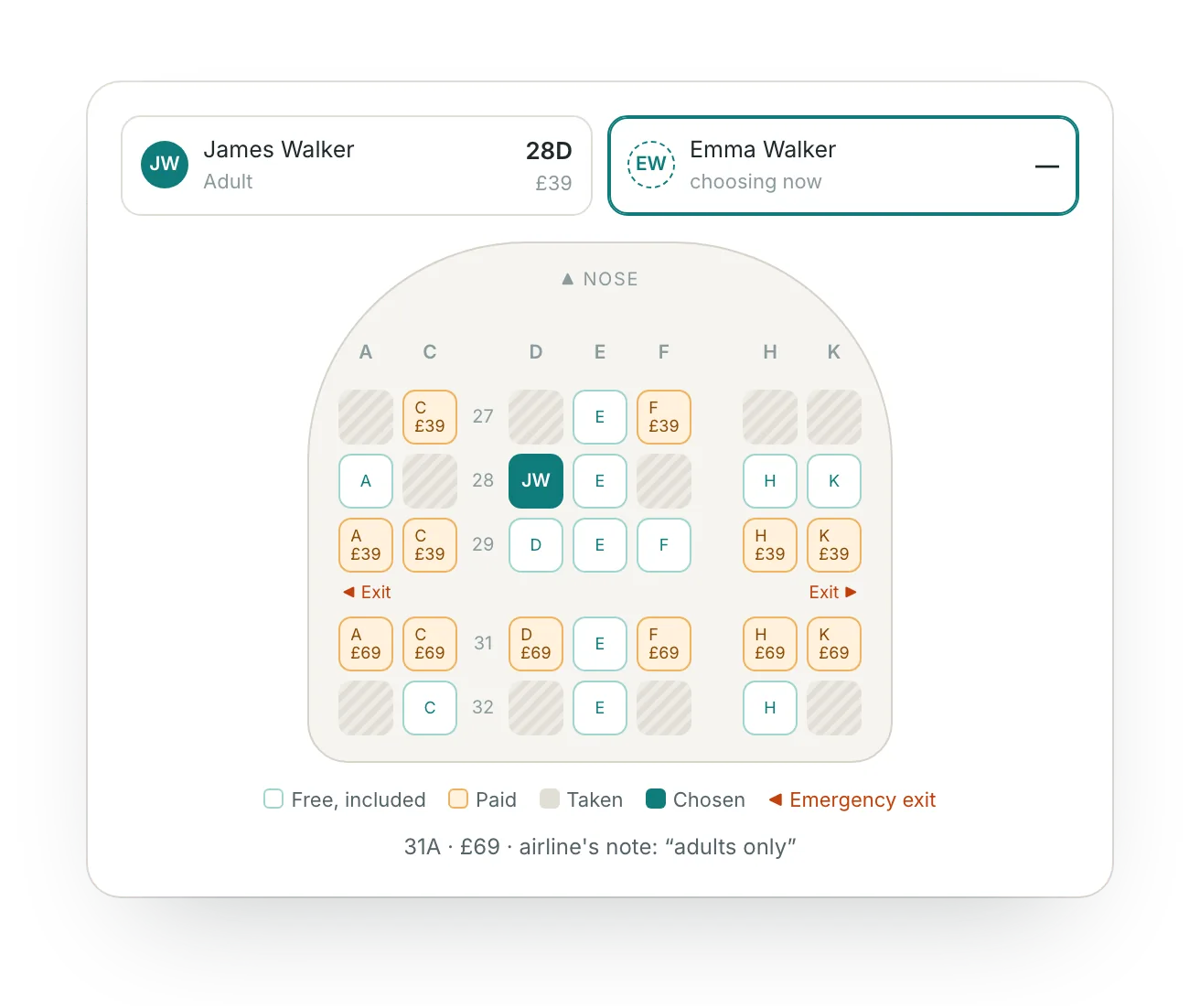
When the airline sells seats, you choose for each passenger on the flight's real map: free, paid, taken, emergency exits.
- One passenger at a time. Once a seat is chosen, it moves on to the next passenger and the next flight.
- Prices on the seat. And the airline's notes, such as the exit-row rules.
- Extra bags per passenger and per leg, with the price.
- In the flight's cost. Seats and bags go into the cost, with the agency's markup.
After booking
Holds, changes and cancellations, from the same file
Hold and deadline
Put it on hold if the client hasn't decided yet: seats kept until the deadline, free. The day before, whoever follows the file gets a reminder; you pay the hold in one click.
On hold until 12 Oct, 11:20 · price guaranteed until the 11th
Change flight
Choose the leg and the new date: see the possible flights with the difference and the fee, and confirm. The row moves to the new day with the new flight.
New flight 23 Nov · to pay £105, of which fee £21
Cancel and refund
First the CRM asks the airline how much it refunds and where: to the balance, the card or as credit. Within 24 hours of issue the refund is usually full.
Paid £623.40 · refund £623.40 to the balance
Airline schedule changes
They arrive on their own: notification, file history, label on the row. See before and after, accept, and prepare a message to the client to review.
Schedule changed by the airline · 11:50 → 12:35
Flights to handle
In Confirmations, at the top: holds about to expire, tickets being issued and changed schedules across all files, with the button that opens the booking.
3 flights to handle · 1 hold expires tomorrow
Who can book
Everyone can search and put flights in the quote; only those with the «Book flights» permission can book, pay and cancel.
Operator role · Book flights: no
Your client
Knows what they buy, before accepting
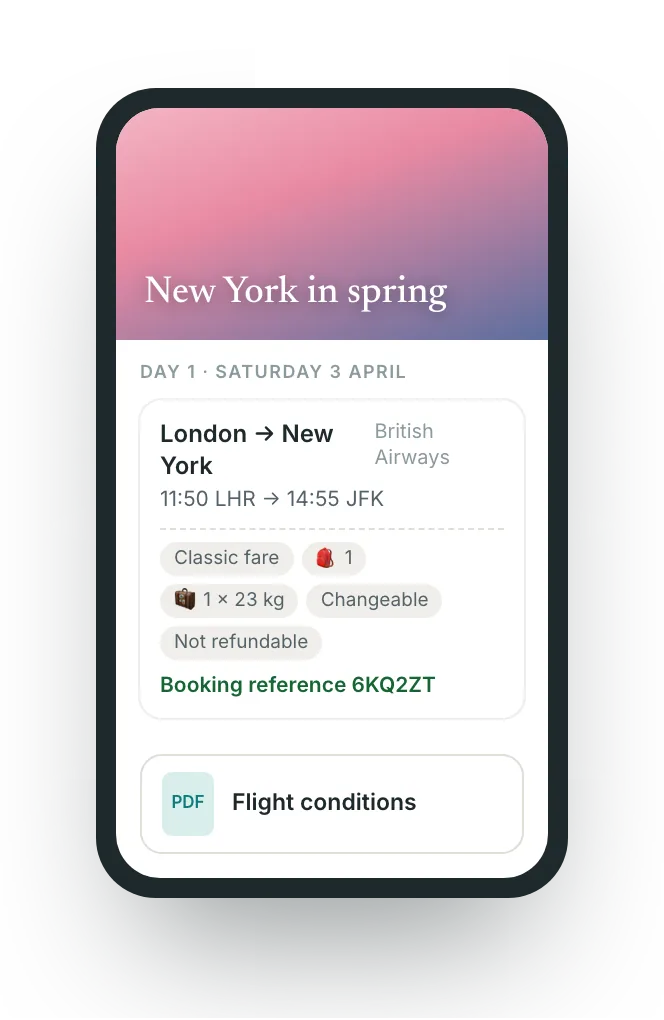
- In the portal, under the flight: fare, bags per person, whether it can be changed or refunded. Never your costs.
- The «Flight conditions»: for each ticket the fare, bags, changes and refund with the fees, who issues the tickets and who receives the data. The client accepts them with the other documents and the CRM keeps what was accepted.
- After booking the portal and the PDF contract show reference and tickets. If a flight is cancelled, the reference disappears.
- In the client's language, in six languages.
Invoices and VAT
A flight alone or inside a package: the CRM knows the difference
A ticket issued in the passengers' names is not a sale in your own name. The Tax tab recognises it file by file and the invoice follows.
Flights only
Intermediation
The ticket is an amount collected in the client's name and on their behalf, outside the taxable base; your markup becomes your booking fee, with the VAT of where the flight takes place. It holds for one ticket or more.
| British Airways ticketdisbursement, outside the base | £1,506.00 |
| Booking fee for the flightinternational flight: zero-rated | £151.00 |
Flight with hotel or other services
Package, margin scheme (TOMS)
Flight and hotel together are a package sold in your own name: the flight goes into the trip's costs and the margin, like any other service, with the information form and the package conditions.
| Trip, 15 daysprice to the client, margin scheme, no VAT shown | £4,890.00 |
| Costs: flight and hotelfor the direct benefit of the travellers | £3,940.00 |
| Agency marginVAT is calculated on this | £950.00 |
An example for your country. Each market with its own rules and wording. An estimate: it does not replace the agency's tax adviser.
What it costs
You pay for bookings, not searches, and many are already included
To Itinovo
€3 VAT excluded, per booking beyond those included
The cost adapts to your agency. You pay €3 per booking issued, whatever the number of passengers and legs, but every month you get a bundle of free bookings included in your Itinovo subscription:
- Searches and price checks: free
- Holds never paid: free
- Test bookings: free
- Cancelled within 24 hours: free
- During the Itinovo trial: free
Professional plan, one month: 40 searches, 14 bookings
of which 2 cancelled within 24 hours, 1 hold expired
11 issued, 5 included in the plan
6 bookings × €3€18
To Duffel, directly
The flight and its fees
The price of the flight comes out of your account's balance. Duffel charges its per-booking fees to the card you register, at the end of the month, under its price list. No set-up costs, no subscription.
Duffel's price list →The markup you apply to the flight is yours: you set it in the agency's settings, once for all flights, and you can change it row by row.
Frequently asked questions
- Do I need to be an IATA agency?
- No. Duffel issues the tickets under its own IATA accreditation, in the passengers' names. If your agency is already accredited, you can ask Duffel to use your own agreements.
- Who collects the money for the flight?
- You do, from the client, as for the rest of the trip. You pay for the flight from your Duffel account's balance. Itinovo touches neither the money nor the tickets.
- Can I try it without paying?
- Yes: with a test token Duffel returns fake flights and nothing is paid. Every test booking is marked «Test» and never goes to the client as real.
- Do I have to retype passports?
- No. In the «Passengers» step you upload a photo of the document and the AI fills in name, birth date, sex and number; you check and confirm. The data stays on the traveller's card for future trips.
- How many bookings are included?
- 5 a month on Professional, 20 on Business; on Starter each booking costs €3. Included bookings restart every month and don't carry over. Searches, tests and cancellations within 24 hours never count.
- Which airlines will I find?
- Those connected to Duffel, over 300, including many NDC fares that airlines sell only through their direct channel. Which ones appear depends on the route and the date.
- What if the client changes their mind after issue?
- From the file you see how much the airline refunds before cancelling. Within 24 hours of issue the refund is usually full; after that the fare rules apply, which the client read in the conditions.
- Who receives schedule changes?
- The agency, if you choose to give the airlines its contact details (recommended). They arrive in the CRM for whoever follows the file and for the people you choose.
- Where does passenger data go?
- To the airline through Duffel, for the booking only and with your agency's account. Duffel is your agency's choice: the processing is governed between the two of you.
- What if I disconnect the account?
- The bookings stay in the files and in Duffel's dashboard; they can no longer be managed from the CRM until you reconnect it.
The right flight, in the right quote, in a minute
Connect your Duffel account, try it with the test token, book when you're ready.
Start free 30-day trialNo credit card requiredGuided setupExport your data