
After the sale, every day’s work on one page
On every plan · people and vehicles from Professional
From the sale to the departure, in three steps
Ask for the confirmations
From the sold booking a request goes to every supplier, with the reminders. The supplier confirms with one click, no account.
Assign who does it
On your agency’s rows choose the guide, tour leader, driver and vehicle: whoever is free and speaks the group’s language comes first.
Every morning, the Operations
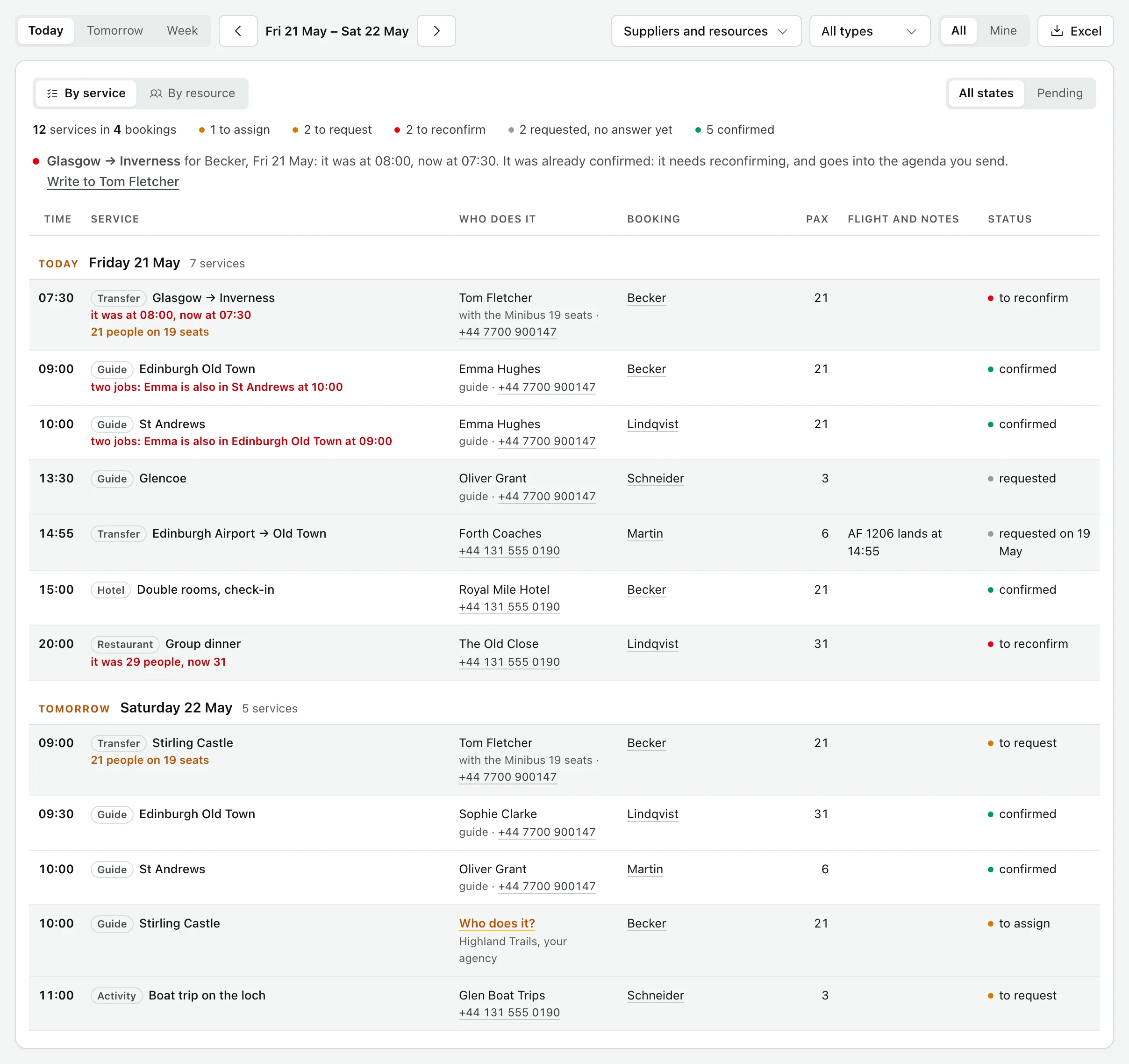
Today and tomorrow for everyone, by the hour. On top what is missing: who has not answered, what changed, who still has nobody.
What is missing, before it is missed
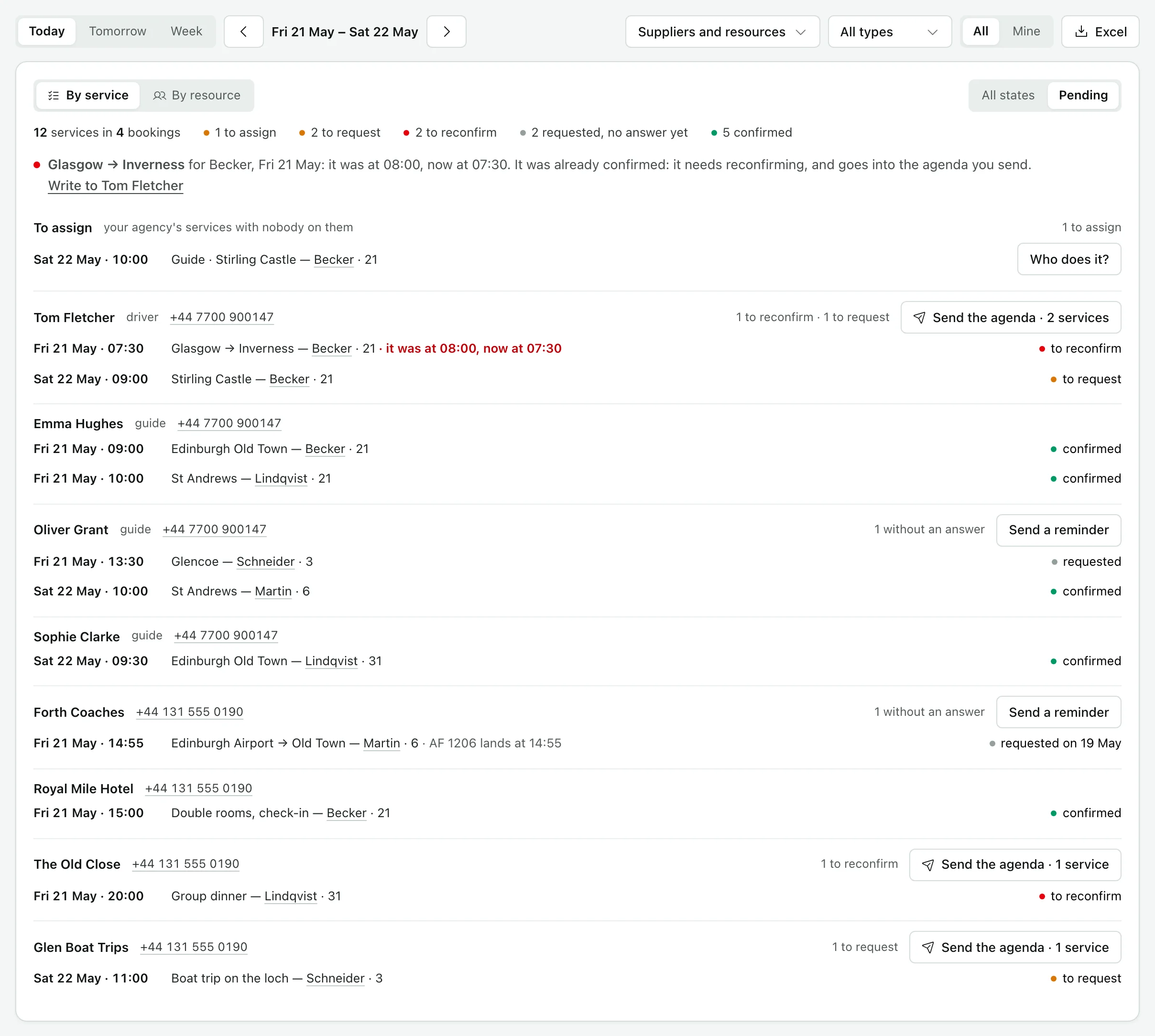
One click and only the open services are left, by supplier and by person. Beside each one, the button it needs: «Send a reminder» for whoever has not answered, «Send the agenda» for what is still to request, «Who does it?» for what still has nobody.
- To reconfirm. A time or a headcount changed after the confirmation shows in red, with before and after.
- Who has not answered. When it was requested, with the reminder one click away.
- To assign. Your agency’s services with nobody on them, at the top.
Who is free, day by day
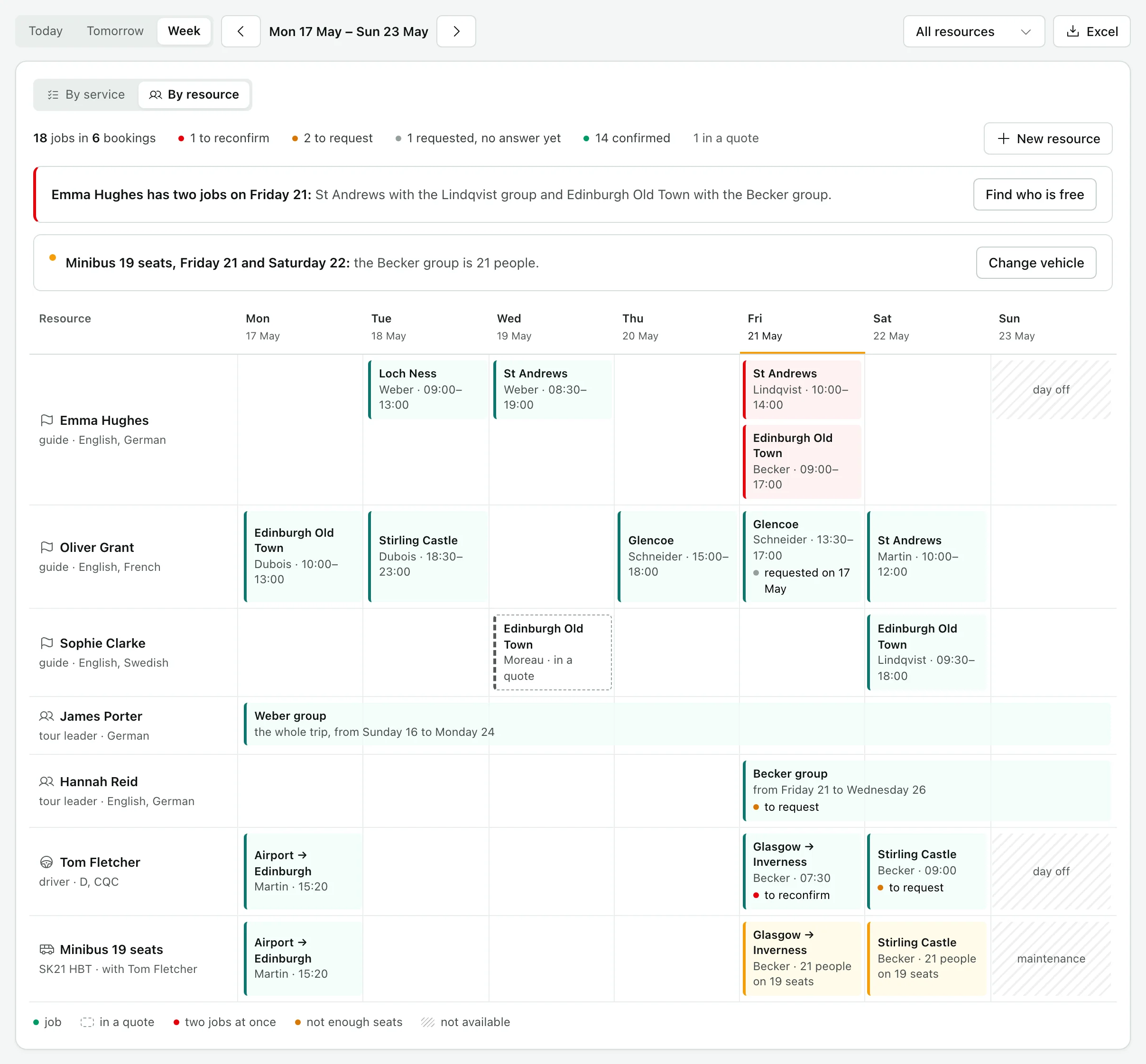
Your agency’s guides, tour leaders, drivers and vehicles in one week. Two notices only: a person with two jobs at once, a vehicle with fewer seats than the group.
- Two jobs at once. In red, with «Find who is free», which opens the choice without leaving the Calendar.
- Not enough seats. The 19-seat minibus for a group of 21, with «Change vehicle».
- Days off and maintenance. The days a person or a vehicle is unavailable, hatched.
From the booking’s row, the right person
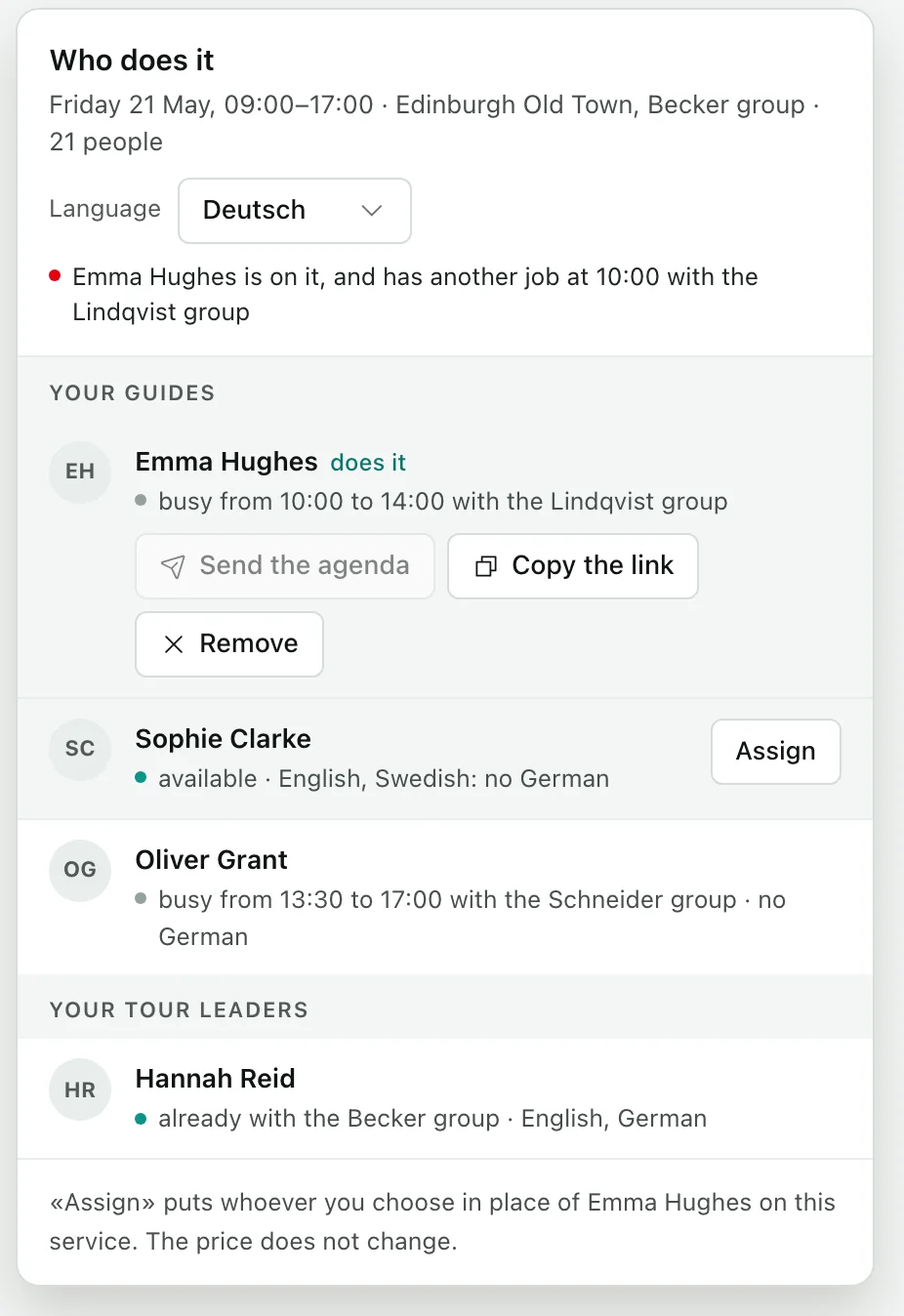
On a guide, an activity or a transfer, «Who does it?» suggests first whoever is free and speaks the group’s language, then the others with the reason, then the local suppliers.
- The language of the service. A tour in German puts the German speakers at the top.
- Advice, never a block. You can assign someone who is busy too: you see it, and you decide.
- The price does not change. Assigning touches neither cost, price nor margin.
On the phones of the people on the job
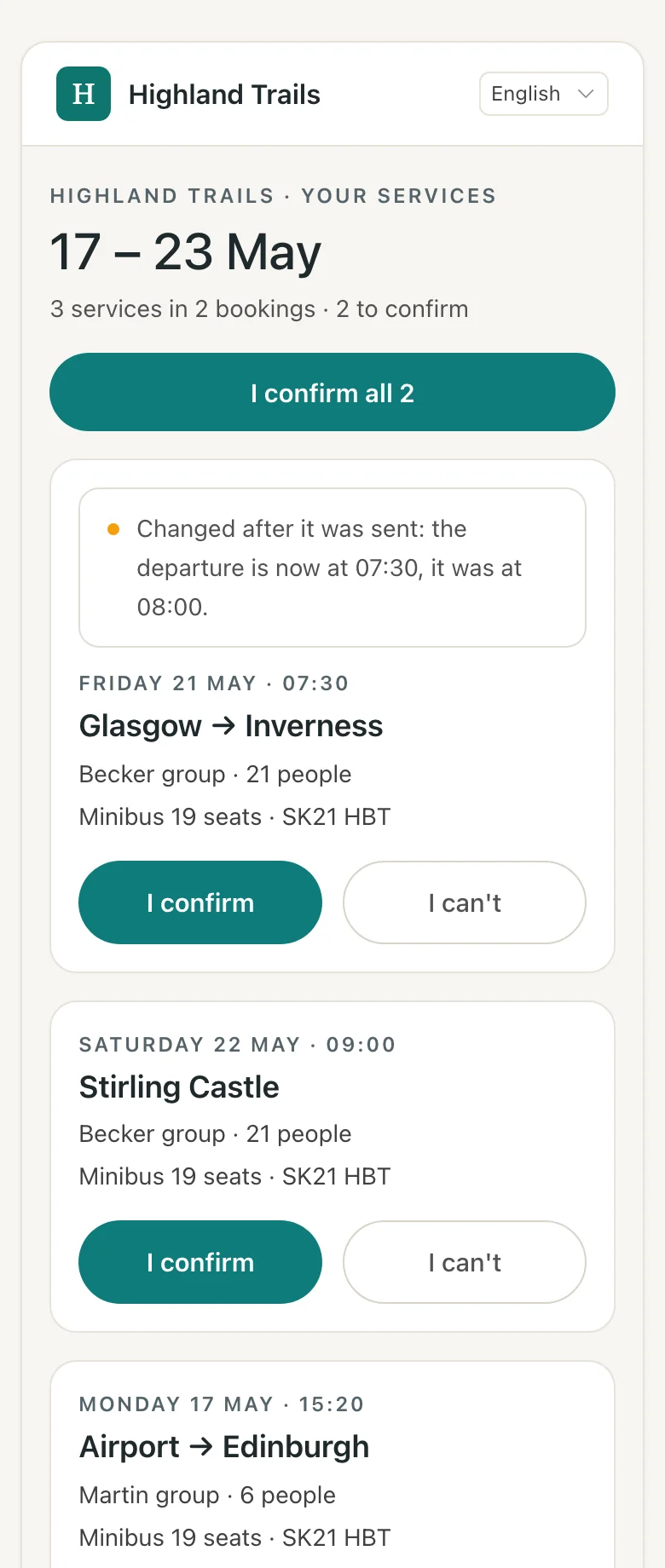
Guides and drivers get an email with the period’s services and a link to their agenda, no account needed. They confirm with one click, one per service or one for all.
- One email for the week. Not a message per service: five transfers, one email.
- The changes on top. A time changed after the confirmation needs reconfirming, and the page says so before anything else.
- «I can’t» too. With the reason: the service goes back to «to assign» and you know at once.
«What’s on tomorrow?»
The CRM’s assistant, Claude and ChatGPT read the same Operations. Ask in your own words: the answer comes with the bookings and the names.
- Who I still have to hear from. Suppliers and people who have not answered, in the period you say.
- Who is free on Saturday. The free guides who speak the group’s language, and the assignment straight from the chat.
- Before sending, it asks. The agenda goes only after your yes, with the text in front of you.
What’s on tomorrow?
- Reads tomorrow’s Operations
Tomorrow 5 services in 4 bookings. Three things are still open:
Who can do the guide at Stirling Castle?
- Looks for who is free on Saturday
Emma Hughes is free on Saturday and speaks German, like the group. Hannah Reid is already with the Becker group. Shall I assign Emma?
I have not assigned anything: I am waiting for your yes.
With spreadsheets and messages, and with itinovo
With spreadsheets and messages
- Every morning you open every booking to know what is on today.
- The suppliers’ confirmations are in the emails, and nobody knows who is missing.
- Only whoever called them knows who is guiding on Saturday.
- A time changed after the confirmation stays in someone’s message.
- The same guide ends up on two groups at the same time.
- The driver gets a message per service, and confirms by phone.
With itinovo
- Today and tomorrow for every supplier and your people, in one table.
- «Pending» says who has not answered, with «Send a reminder» beside it.
- Every row says who does it, with the phone number to tap.
- A changed service needs reconfirming and goes into the agenda you send.
- Two jobs at once show in red, with «Find who is free».
- One email with the services of the period and one click to confirm them.
In detail
The small things that matter at seven in the morning.
Frequently asked questions
- Do suppliers, guides and drivers need an account?
- No. They answer from a link in the email, on the phone or the computer, with one click per service or one for all.
- Do I need guides and drivers of my own?
- No. The Operations covers every supplier of the booking. People and vehicles are for those who have guides, tour leaders, drivers or vehicles of their own.
- Does assigning a person change the price of the trip?
- No. Cost, price and margin stay those of the quote: what changes is who does the service.
- Which plan includes it?
- The Operations is on every plan. The confirmation requests written by the CRM, with the reminders, and the people and vehicles are on the Professional plan.

Try the Operations on your trips
Confirmations, people and agendas in the booking where the quote already is. The Calendar’s example shows a whole week even before your data.
No credit card required · Guided setup · Export your data