
Everyone sees their own
Each branch and each salesperson sees their own bookings, not everyone else's
Organise your agency into branches and departments, give everyone a role and decide who sees costs, margins, passports and health data. The typical roles of a travel agency are ready; your own start from there. On the Business plan.
No credit card required · Guided setup · Export your data
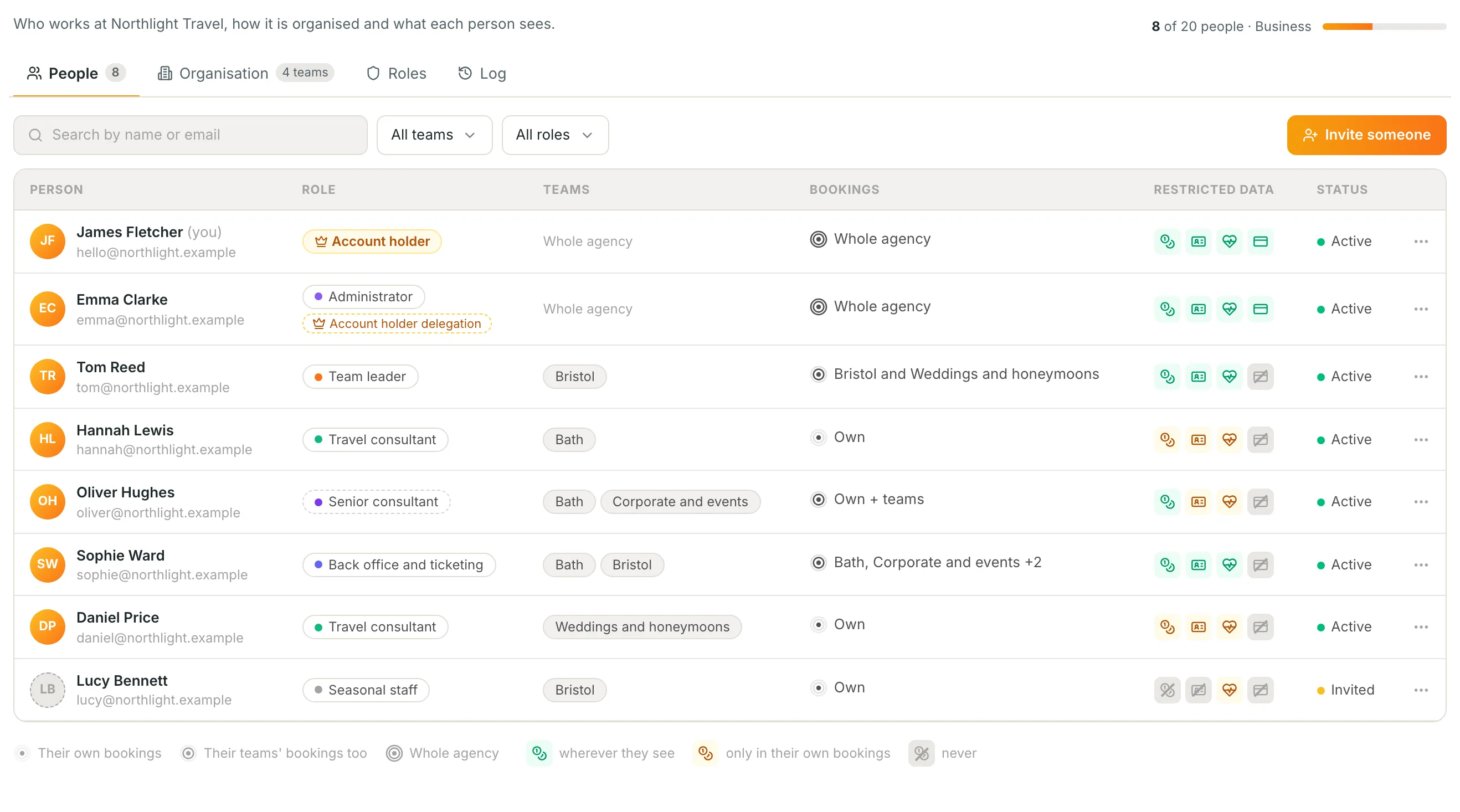
From an agency where everyone sees everything to an agency in order, in three steps
Set it up once and it works by itself: every new booking joins the team of whoever creates it.
- 1
Draw your agency
Branches and departments, even one inside another: Bath, Bristol, «Weddings and honeymoons» inside Bristol. The bookings you already have move into their teams with one bulk assignment.
- 2
Give everyone their role
Travel consultant, team leader, back office, accounts, seasonal staff: ten typical roles ready to use. For a special case you duplicate one and change only the cells you need.
- 3
Check through their eyes
«View Itinovo as…» opens the app as a colleague sees it, read only: the same lists, the same hidden fields.
From «everyone sees everything» to «everyone sees their own»
Without permissions
- The new seasonal hire sees the margins and invoices of the whole agency
- Every branch sees the others' bookings and clients overlap
- Passports and health data open to anyone with a login
- Nobody knows who changed the permissions, or when
- To protect the data, people end up without access
With itinovo CRM
- Costs and margins only for those who must see them, decided by the account holder
- Each branch sees its own bookings; the account holder and whoever has the whole agency see everything
- Passports and health: never, only in their own bookings, or wherever they see
- The Log tells who changed what, before and after
- Everyone works in the CRM, each within their own reach
Permissions that read like a sentence
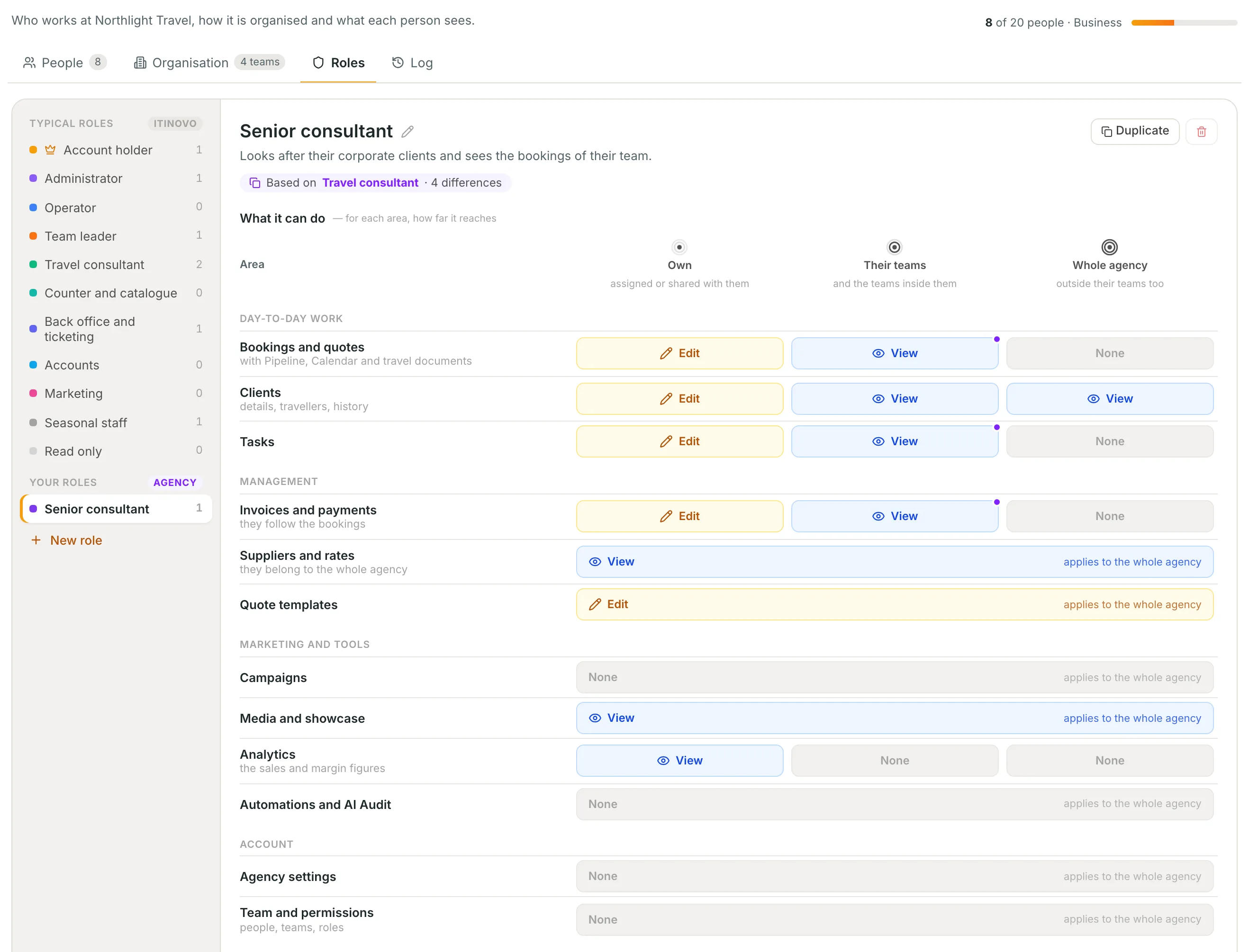
For every area three circles — their own, their teams', the whole agency — and in every cell None, View or Edit.
- Typical roles ready, never to redo
- Itinovo's roles are not edited, they are duplicated: they stay a safe starting point, and we update them when a new area arrives.
- Reserved data on three levels
- Costs and margins, identity documents, health, payment details: never, in their own bookings, wherever they see. Everyone sees only the personal data they need.
- The account holder's delegation
- A partner can grant permissions on the account holder's behalf; when they grant something about money, the account holder is told and can undo it in one click.
- Notifications and AI assistant with the same reach
- Alerts and the assistant's answers follow the role: nobody reads elsewhere what they do not see in the CRM.
Frequently asked questions
- Which plan?
- Teams, roles and permissions are on the Business plan, for up to 20 people. The other plans have the three usual roles, Administrator, Operator and Read only, and everyone sees every booking.
- Can more than one person work on a booking?
- Yes: besides the person it is assigned to there are collaborators, who see it and work on it even when the booking belongs to another team.
- What happens if I move to a lower plan?
- Teams and roles stay saved and count again if you come back to Business; in the meantime everyone sees everything, as on the other plans.
Grow your agency without opening everything to everyone
Branches, departments, roles and reserved data, with a Log of every change. Try it in the 30-day free trial.
Start free 30-day trialNo credit card requiredGuided setupExport your data